Most job management apps are built around the same four steps. A customer calls, you quote, you schedule someone, you invoice. That covers a huge amount of trade work, and for a lot of businesses it is genuinely all you need.
Then you put an HVAC business through it.
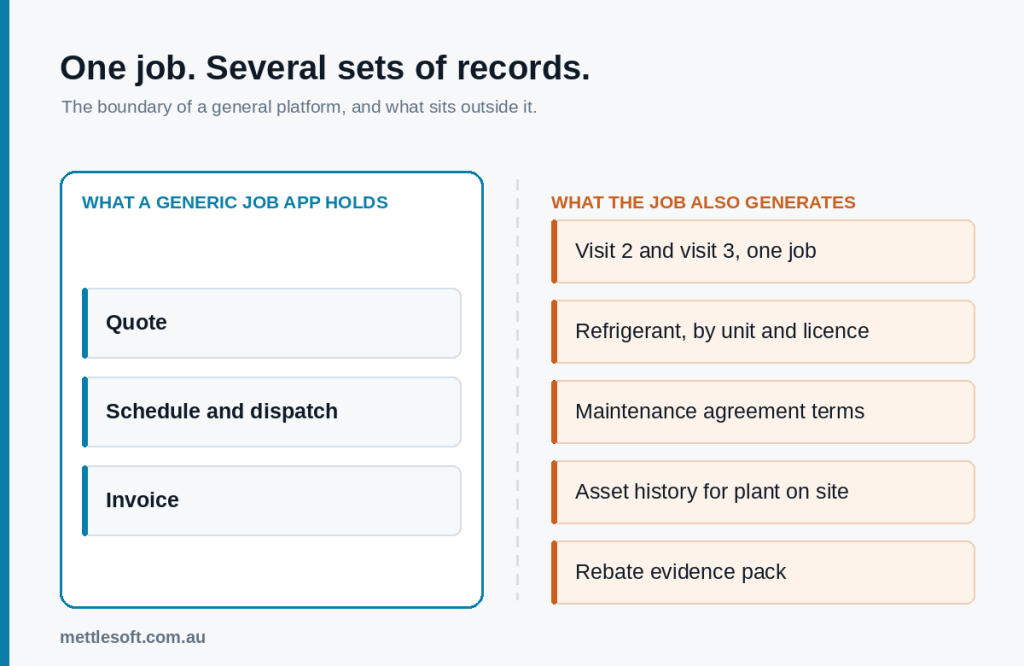
The job takes three visits because the part is on backorder. The customer is on a maintenance agreement, so half the work isn’t billable and the other half is. The technician who attended holds a Refrigerant Handling Licence and the refrigerant he recovered has to be recorded against that licence and that specific unit. There’s a rebate claim attached, which means a form nobody outside Victoria has ever heard of. And the invoice has to carry your Refrigerant Trading Authorisation number, because that’s been mandatory since 2009.
None of that fits neatly into quote, schedule, invoice.
The generic app was built for a different trade
This isn’t a knock on off-the-shelf software. The platforms in this market are good at what they were designed for, and they were designed for the broad middle of the trades: one visit, one job, one invoice, a photo of the finished work, done.
HVAC sits outside that middle in ways that compound. A single commercial service agreement can generate scheduled visits for years, each one attached to specific plant, each one producing records that have to be retrievable if the Australian Refrigeration Council comes asking. The admin isn’t a side effect of the job. On a lot of jobs, it is the job.
So the useful question is a requirements question, not a rankings question. What does your business actually need to record, and how much of that can a general platform carry before the workarounds start costing more than the software saves?
Here’s what we’d put on that list.
Multi-visit jobs, and jobs that come back
A job that spans three visits over five weeks needs to hold together as one thing. One job number, one running record of what was done each time, one set of parts consumed across all three, one invoice at the end.
Plenty of apps handle this by letting you create a “job” with multiple “visits.” Test it properly before you believe it. The common failure isn’t that the feature is missing, it’s that the reporting treats every visit as a separate job, so your average job value and your first-time-fix rate both come out wrong. If you’re using those numbers to decide anything, that matters.
Maintenance agreements that generate their own work
Recurring maintenance is where a lot of HVAC businesses make their margin, and it’s the single most common thing generic job apps handle badly.
What you want is an agreement that sits above individual jobs: it knows the site, the equipment covered, the visit frequency, what’s included in the fee and what gets billed on top. It should raise the next scheduled visit without anyone remembering to. It should tell you, in March, which agreements are up for renewal in June.
Most job apps will let you set a recurring job, which sounds like the same feature and isn’t. A recurring job puts an entry in the calendar. An agreement tracks a commercial relationship with terms attached to it. When you’re carrying eighty of them, that gap is somebody’s full-time job.
Compliance records that survive an audit
Refrigerant handling in Australia carries record-keeping obligations at both the technician and the business level. The technician needs a Refrigerant Handling Licence. The business needs a Refrigerant Trading Authorisation to acquire, store or dispose of fluorocarbon refrigerant. Both sit under the Ozone Protection and Synthetic Greenhouse Gas Management Regulations 1995, and the ARC audits against them.
In practice that means every refrigerant event, top-up, recovery, disposal, needs to be tied to the equipment, the quantity, the technician and the date. It also means your invoices, receipts and quotes need to display your RTA number.
Two things to check. First, can the app capture refrigerant data as a structured field on the job, rather than as a note typed into a comments box or a photo of a handwritten card? Notes and photos are records, technically. They’re just not records you can produce on demand when someone asks for eighteen months of them sorted by unit. Second, can you get your RTA number onto the invoice template without paying someone to customise it?
That second one sounds trivial. It’s the kind of thing that turns out to be a support ticket and a three-week wait.
Site and asset history
When a technician arrives at a commercial site, the useful question is what’s on the roof and what has it done lately. Make, model, serial, refrigerant type and charge, install date, who’s been there before and what they found.
An app that organises everything around the customer can’t answer that. An app that organises around the asset can. For residential work this barely matters. Once you’re servicing a site with a dozen rooftop units spread across several buildings, it’s the difference between a technician who arrives informed and one who arrives asking the building manager which unit is playing up.
What the technician can actually do on site
Plant rooms have no signal, roofs are bright enough to wash out a screen, and anyone on a ladder is working one-handed.
Test the mobile side in the conditions your people work in, not in the office on wi-fi. Can they complete a job offline and have it sync later without duplicating anything? Is the screen readable in direct sun? How many taps to log a part? If the answer is eleven, your technicians will stop logging parts, and your job costing will quietly stop being true.
The gap between what an app can do and what a tired technician will do at 4pm is where most implementations fail.
Rebate and incentive paperwork
If you’re doing work under the Victorian Energy Upgrades program or a similar scheme, the paperwork has its own shape. Evidence requirements, accredited provider details, customer declarations, equipment eligibility, submission deadlines. It attaches to the job, but it doesn’t look like anything else on the job.
Almost no general job management app has a concept of this, because outside a few Australian states there’s no reason for it to. Businesses end up running rebate admin in a parallel spreadsheet, re-keying customer and equipment data that already exists in the job app, and reconciling the two by hand.
That’s workable at ten claims a month. It stops being workable somewhere north of that, and what breaks first is claim accuracy rather than speed. Rejected claims cost more than slow ones. We’ve written separately about what the 2045 extension means for HVAC providers, and the admin load is the part of that story most operators underestimate.
If that’s where you are, we’ve gone deeper on what to do about rebate admin.
Getting your data back out
Ask, before you sign: if we leave in three years, what do we get?
A CSV of customers and invoices is the usual answer. What you want is job history, asset records, attached documents and compliance data in a form you can actually load somewhere else. If the answer is vague, treat that as a fair preview of how much room you’ll have to negotiate later.
How to run the trial properly
Software trials reward the vendor. You spend two weeks doing simple things well and conclude the app is good at simple things.
A better approach: pick three real jobs from the last year and push them through end to end. Choose the messiest ones. The multi-visit warranty job with the backordered compressor. The commercial agreement site with the disputed variation. The rebate claim that got queried.
If all three come out clean, the platform fits and you should buy it. If one of them requires a workaround, note the workaround and price it. Twenty minutes a day of manual reconciliation works out to about 80 hours a year. Put your own admin rate against that, add whatever the errors cost you, and remember the person doing it eventually takes annual leave.
When off-the-shelf is the right answer
Often. More often than an agency is supposed to admit.
If you’re under about fifteen field staff, mostly residential, mostly single-visit work, not carrying many maintenance agreements and not doing rebate volume, a standard job management platform will serve you well and cost a fraction of anything built. Buy one, configure it properly, train your people on it, and spend the saved money on something else. Building software to avoid a problem you don’t have is an expensive way to feel sophisticated.
The same holds if you have one awkward requirement. One workaround is a workaround. It’s annoying and it’s survivable.
When it stops being the right answer
The picture changes when the requirements start colliding.
Two or three of the things above landing at once is the pattern we see most: maintenance agreements plus asset-level compliance records plus rebate claims, all supposed to describe the same job, all living in different places. At that point the real decision is whether to keep paying for reconciliation indefinitely or build something that holds the whole workflow in one place.
We built for a Melbourne HVAC contractor sitting exactly there. Their admin workload had grown to about seven days a month. It now runs at two.
The tell is usually a person. Somewhere in the business there’s someone whose actual job has become moving data between systems that were each supposed to save time. When you can name that person, the maths has already changed.
That’s the point where a custom build starts to make sense, and it’s worth reading our take on when an Australian SMB should build its own software before you go any further. Not before that point. We’d rather tell you to buy something off the shelf than sell you a build you don’t need.
If you’re at the collision stage and want a second opinion on whether you actually are, get in touch. Or if you’d rather work it out for yourself first, here’s how to tell when you’ve outgrown your field service software — the workaround count, the per-seat maths, and the evidence packs most job apps were never built to produce. We work with HVAC and trades businesses across Australia, and we’re comfortable telling people their existing platform is fine.