Nobody wakes up one morning and decides their field service management software has stopped working.
It goes the other way. A spreadsheet appears because the software won’t track something. Then a shared drive full of photos, because the app compresses them and the auditor wants originals. Then a WhatsApp group for the jobs that don’t fit the job types. Then someone in the office who just knows which claims are still open, because no report shows it.
Three years on you’re running the business on software plus six workarounds, and the workarounds are where the actual knowledge lives.
That’s the bit worth talking about. Field service management software is fine. For most Australian operators it’s more than enough and will stay that way, and if you’re still choosing one, what to look for in a job management app is the more useful read. The question here is what happens once you’re past the size it was designed around, and whether the answer is a different subscription or something built to fit.
This applies whether you’re running HVAC crews, a solar O&M portfolio, BEMS and facilities contracts, construction site works or a logistics fleet. The category is the same. So are the ceilings.
The workaround audit
Open your shared drive. Count the spreadsheets that exist because the software can’t hold something. Count the folders of photos sitting outside the job records. Count the recurring calendar reminders that exist because nothing in the system chases the thing on its own.
Then ask which of those, if the person who maintains it left tomorrow, would take you more than a week to rebuild.
That number is the honest answer. One or two workarounds is normal, every business has them. Six or seven with a couple of them load bearing means the software quietly stopped being your system of record and nobody sent a memo.
When the per-seat maths turns
Per-head pricing is a good deal at six field staff. It’s a different animal at twenty-five, and different again when you’re paying for subcontractors, drivers or seasonal crews who only touch the system a few weeks a year.
Run it properly rather than from memory. Take the monthly licence cost, multiply by twelve, then do it again at the headcount you’re planning for in three years. Add the modules you pay for separately, the extra storage, the integration connector, whichever API tier you’ve ended up on. Add the annual increase.
Then put a number on the admin hours your workarounds eat. Not the field time. The office time. The reconciling, the re-keying, the chasing of photos that never made it onto a job.
For plenty of businesses that total still comes in well under the cost of building something, and that’s a perfectly good result. But the crossover does exist, and it tends to arrive earlier than owners expect, because the licence shows up on a bill every month while the admin hours are invisible and get paid in evenings.
The part the software was never built to do
Field service management software is built to run a job. Quote, schedule, dispatch, complete, invoice. It isn’t built to produce evidence about that job to a regulator three years later.
That distinction barely matters if your work is unregulated. It matters enormously if it isn’t, and most Australian field sectors now sit on the wrong side of that line.
Take rooftop solar. To create STCs, the Clean Energy Regulator requires photographs from three separate stages of the installation, job setup, a mid-install checkpoint and testing, each one clearly showing the installer’s face, carrying date, time and geolocation metadata that lines up with the compliance paperwork. Installers are explicitly not allowed to return afterwards and take photos to match. On top of that sit five mandatory installer declarations, separate designer statements, and six more written statements where a solar retailer is involved, all tied to accreditation numbers and equipment serials.
Now think about what your field app does with that. It has a photo field. It does not know that three specific photos must exist, at three specific moments, with a face in them and metadata intact, before the claim is worth anything.
The same shape shows up everywhere else. Under Victorian Energy Upgrades, the Essential Services Commission wants geo-tagged photographs showing brand, model and serial numbers, evidence that gas pipes were sealed and the old equipment made permanently unusable, safety certificates recording the decommissioning method, invoices showing what the customer actually paid, and room dimensions for multi-split installs, with records surviving six years past certificate creation and assurance audits at least every two years. If that’s your bottleneck specifically, the narrower fix is to automate the rebate admin itself rather than replace the whole platform.
In BEMS and facilities work the evidence is the data trail. A NABERS rating is built from twelve months of actual metered consumption, not a snapshot, which means the value sits in continuity and provenance rather than in any single job record. We’ve written separately about how a building energy management system earns its keep, and the reporting burden is a large part of the answer.
Construction runs on inspection and test plans signed off at every hold point. Logistics runs on chain of responsibility and proof of delivery. Consultants get asked to show their working two years after the recommendation.
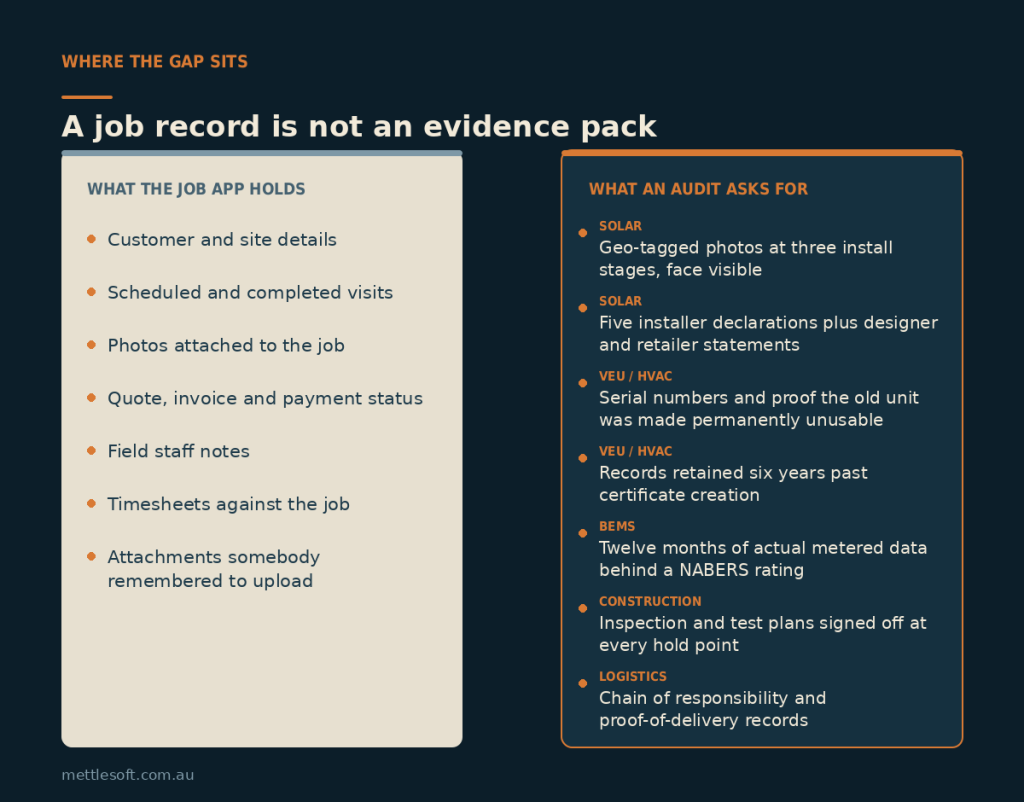
The pattern doesn’t change across any of them. The photo is attached to a job, probably compressed, possibly stripped of its location data. The serial number is typed into a notes field, or photographed as a sticker and never transcribed. The accreditation or licence number sits on an invoice template rather than against the person and the job. Nothing checks that a pack is complete before it goes out, because the software has no idea what a pack is.
That isn’t a fault in the product. It was never sold as a compliance system. It does mean the compliance layer gets carried by a person, though, and people leave, and audits turn up regardless.
Easy way to test it: if an auditor asked for the full evidence pack on one job from two years ago, how long would it take you, and how many places would you have to look?
The reports that don’t exist
The third ceiling is quieter, and it usually surfaces in a conversation with your accountant.
You want true job profitability by site across eighteen months, return visits and warranty work included. Or which maintenance contracts are genuinely making money once travel is counted. Or the average gap between work completed and claim submitted. Or, if you’re managing an O&M portfolio, which assets are quietly eating your margin in callouts.
The report isn’t there. The export hands you a flat CSV that loses the relationships between jobs, visits and assets. The API gives you today’s state but not the history. So somebody rebuilds it by hand in Excel, and because that takes two days, it happens twice a year instead of quarterly.
The cost isn’t the two days. It’s the decisions you don’t get to make because the number was never in front of you.
What building something actually looks like
The word custom makes people picture starting from scratch and spending a year without working software. That’s rarely what happens and rarely what should.
Most of the time the sensible move is much narrower. Keep what works, including the scheduling and the mobile app your crews already know, and build only the part the category doesn’t serve. A claims and evidence system that pulls from the job records and validates a pack before submission. A reporting layer that reads from the platform you already have and keeps the history properly. One integration that ends the double entry between the field app and the accounting file.
Smaller build, no retraining in the field, and the effort goes where the pain is. Sometimes a full rebuild is right. More often it’s a layer. We’ve written before about off-the-shelf versus building your own and the same rule holds here: the decision is about fit, not ambition.
So the question to bring to that conversation isn’t whether to go custom. It’s which two workarounds cost you the most, and what it would take to kill just those.
A worked example: BEMS maintenance and the NABERS data gap
Here’s the shape of it. The example below is illustrative rather than a specific client, but the failure mode is a common one in controls and building services.
Picture a BEMS and controls contractor with around eighteen field engineers, holding planned maintenance contracts across forty-odd commercial office sites in Melbourne and Sydney. A good number of those buildings carry NABERS ratings their owners need at lease renewal.
The field app handles the service visits perfectly well. Jobs get scheduled, engineers turn up, reports go out. What it doesn’t do is notice that a data gap opened three months ago.
That happens more often than people admit. A meter drops off the network after a switchboard upgrade. A trend point gets renamed during a controls change and the log quietly starts writing nulls. A tenant sub-meter gets isolated during a fitout and never comes back. None of it generates a fault, none of it stops a job closing, and none of it shows up on a dashboard built around jobs rather than data continuity.
The problem is that a NABERS rating runs on twelve months of actual metered consumption. Continuity is the product. Discover a four month hole in November and you can’t service your way out of it, because the missing months no longer exist to be collected.
So the workarounds appear. A spreadsheet tracking which sites are inside a rating window. An engineer exporting trend data every month to eyeball whether it looks sane. A calendar reminder to chase a meter feed that only one person knows the reason for. Familiar pattern, and all three sit outside the field app.
The build here is small. Keep the field app exactly as it is, including the scheduling and the mobile workflow the engineers already know. Add a reconciliation service that reads the BMS trend data and the meter feeds overnight, checks continuity against each site’s rating window, and raises a job in the existing field app the moment a gap appears. Alongside it, a per-site record that holds point naming, as-built schedules and change history against the asset rather than in a project folder that gets archived the day the project closes.
Nothing is replaced. One integration and a rules engine, sitting on top.
What changes is the failure mode. The gap stops being something discovered at rating time and becomes a job raised the same week, while there’s still room to backfill from the meter provider, re-baseline, or at minimum tell the building owner early rather than late. The monthly manual export check disappears, and the spreadsheet stops being the thing that holds the contract together.
That’s the whole argument in one example. The software wasn’t broken. It was doing its job, and the job it was doing wasn’t the one that carried the risk.
When to leave it alone
People ask us this fairly often and sometimes the answer is: don’t.
Small team, predictable job shape, no certificate or compliance obligation hanging off the work? Off-the-shelf is almost certainly right and will be for years yet. If your workarounds are irritating rather than load bearing, fix the process instead. And if you haven’t properly used the automation your current platform already includes, start there, because most operators run on a fraction of what they’re paying for and it costs nothing to find out.
If the thing driving the conversation is that you don’t like the interface, that isn’t a build case. That’s a different subscription.
The build case is structural. Requirements that collide with each other, evidence obligations the category doesn’t cover, and admin hours that grow with revenue instead of flattening off.
Where to start
Take your last twenty jobs that carried a claim, a certificate or a compliance obligation. For each one, time how long it takes to assemble the complete evidence pack from cold, and write down every system you had to open.
Average under ten minutes, all in one place? Your setup is working, leave it. Half an hour across four locations with one of them being somebody’s phone? You’ve found the thing worth fixing, and you now know exactly what to brief a developer on, whether that developer is us or anyone else.
We’d rather tell you your current setup is fine than sell you a build you don’t need. If you want a second opinion on where your ceiling actually sits, get in touch.